
Everything on your mind,
finally at home.
Bookmarks, notes, mind-maps, to-dos and habits in one quiet tab — and Nookly, an AI helper that puts each thing in its place.
Try the demo

Note saved
To-do added
Subscription tracked
Reading updated
Day planned
Mind-map created
Habit ticked
Bookmark saved
Nookly
Your personal daily AI assistant
- Save Nani's dal recipe to my notes
- Saved in Notes → Recipes.
- Remind me to book the dentist tomorrow at 10:30
- Added to your to-dos — tomorrow, 10:30 am.
- My streaming plan ends on 1 Nov — track it
- Tracking it. I'll remind you before it ends.
- I'm on page 182 of The Hobbit
- Logged — you're 64% through.
- Plan today: deep work at 9, lunch with Ma at 1, a walk at 6:30
- Your day is set — three blocks on the planner.
- Plan our trip to the hills as a mind-map
- Made one with Packing, Route and Stay.
- Mark my morning walk as done
- Ticked — that's a 12-day streak.
- Bookmark slowliving.blog for later
- Saved to Bookmarks → Reading.
Meet Nookly
Your personal daily AI assistant
Remembers what matters
Tell it once: the people in your life, their birthdays, what you like. It remembers, and you can read or change it anytime.
Sara is my wife. Her birthday is 14 March
Nookly
Got it. I'll keep Sara's birthday and bring it up every year.
- Remembered: Sara, your wifeOpen
- Special day added: 14 March, every year
Keeps you on track
Reminders right on time, a short briefing every morning, and an honest look back at how your week went.
Remind me to call Ma at 7 tonight
Nookly
Added. You'll get a reminder at 7:00 pm.
- Added a to-do: Call Ma, today 7:00 pmOpenUndo
Researches for you
What it doesn't know, it looks up on the web, then writes it into your notes, sources and all.
Best time to visit Manali? Save it in my notes
Nookly
March to June for clear skies, December to February for snow.
- New page: Manali, best time, in TravelOpen
- 3 sources from the web
Plans anything from one line
One sentence becomes a mind-map, this week's to-dos, a tracker and notes pages, ready to start.
Make me a plan to learn guitar
Nookly
Here's your plan. Start with this week's to-dos.
- Mind-map: Learn guitarOpen
- 6 to-dos for this week
- Tracker: Practice, 30 days
- 3 notes pages to fill
Inside NookMarker
One quiet home for everything you keep.
Think it through on a board.
Notes that stay where you put them.
Every book, course and show, moving forward.
The little things, handled.
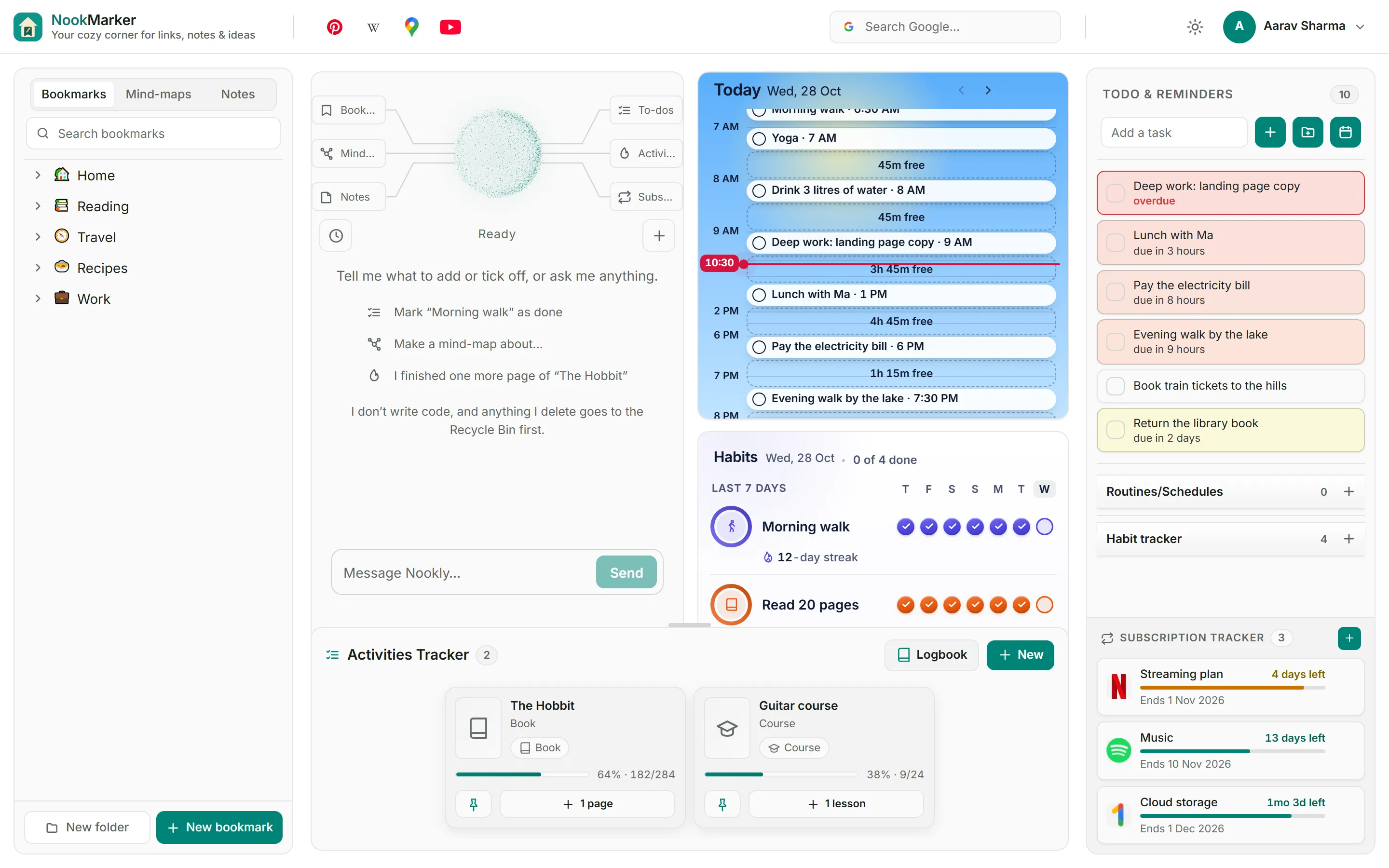
Widgets
Your day and your habits, right on Home.
Save any page
The browser extension saves the page you are on to your shelf, in one click.
Search the web
Six engines built in — type a shortcut like d for DuckDuckGo.
Install on your phone
Add it to your home screen straight from the browser — no app store. On Android, share a link from any app to save it.
Subscription tracker
Make it yours
Make the nook yours.
Keep only the tools you use: switch one off and it hides, your data stays safe. Set your own photo as the wallpaper, and give each device its own look.
- Home with a mountain photo as the wallpaper
- The same Home with Widgets switched off
- Dark theme with a forest wallpaper
- Home with To-dos and Subscriptions switched off
- A wallpaper with strong blur and dimness
- The switches in Settings, Customization
Free on all your devices. Premium for all of Nookly.
Every tool, backup and sync are free with an account. Premium adds full Nookly.
Freemium
₹0
With a free account
- Every tool, unlimited (fair use)
- Backup and sync on all your devices
- Nookly AI, free questions every day
Premium
Coming soon
Not on sale yet
- Everything in Freemium
- Full Nookly, a monthly allowance
- Memory and a daily briefing
- Reminders on your phone, chats on every device
Questions, answered.
Is NookMarker really free?
Yes. Every tool is free and unlimited (fair use), and a free account backs it all up and syncs it. Money only buys full Nookly.
What does Premium add?
Full Nookly: a monthly allowance, Memory, the daily briefing, notifications, and chats on every device. It is a prepaid pack — it never renews by itself.
What is Nookly?
Your built-in AI helper. Ask in Hindi, Hinglish or English — it adds to-dos, notes, mind-maps and bookmarks, and shows you what it changed. It comes with every free account.
Is my data private?
Your account sees only its own data. Crash reports carry no user id, and we send Nookly only to AI hosts that state they keep no data.
Does it work on my phone?
Yes. Install it from your browser like an app — no app store needed.
Can I take my data out?
Any time. Settings → Data exports everything as one zip.
Give your mind a nook, powered by AI. And your browser a new home tab.
Make it your new tab.
Open NookMarker, or set it as your browser's home and new-tab page.
Fill your nooks.
Save links, jot notes, and drop to-dos into folders and mind-maps.
Pick up where you left off.
Every new tab opens exactly where your work already was.